
Before enabling remote login to MySQL database, it is necessary to open port 3306 of the operating system. For cloud servers, if there is a security group set up, it is necessary to open port 3306 in the security group. If there is an operating system firewall set up, it is necessary to open port 3306 in the firewall or close the firewall.
Note: Enabling remote login to the database has security risks, especially for root users. If you must enable remote login, please make the database password as complex as possible. We can enable remote login to MySQL database through phpMyAdmin and command line.
Login to the MySQL database with phpMyAdmin, select the mysql database, open the user table, select the user you need to enable remote connection, click "Quick Edit", and change the value in the host column to % (allow all IP addresses) or the IP address required for remote.
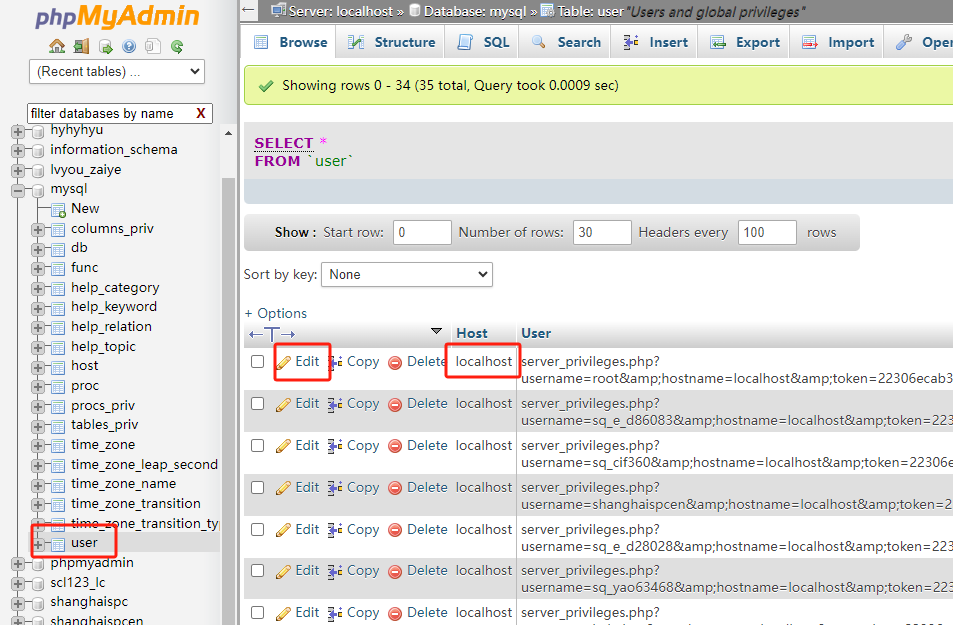
After remote to the cloud server, execute the following command. If it is a Windows operating system, you need to switch to the bin directory under the mysql directory to execute.
mysql -uroot -p
Enter password:
mysql> use mysql;
mysql> update user set host="%" where user="root";
mysql> flush privileges;
Where the host value is replaced by the IP address required for remote, and the user value is replaced by the database user required for remote.
23-02-2024 02:02:07
22-02-2024 03:19:32
22-02-2024 03:16:03
22-02-2024 03:14:03
22-02-2024 03:11:58

